Plans and billing
Plan limits, monthly AI replies, reply packs, auto top-up, and managing your subscription.
Settings → Plan & usage shows your plan, how many AI replies are left this month, and reply packs. Only owners and admins can change the plan or buy packs. Payment happens on a hosted checkout page. Convo.run never sees your card details.
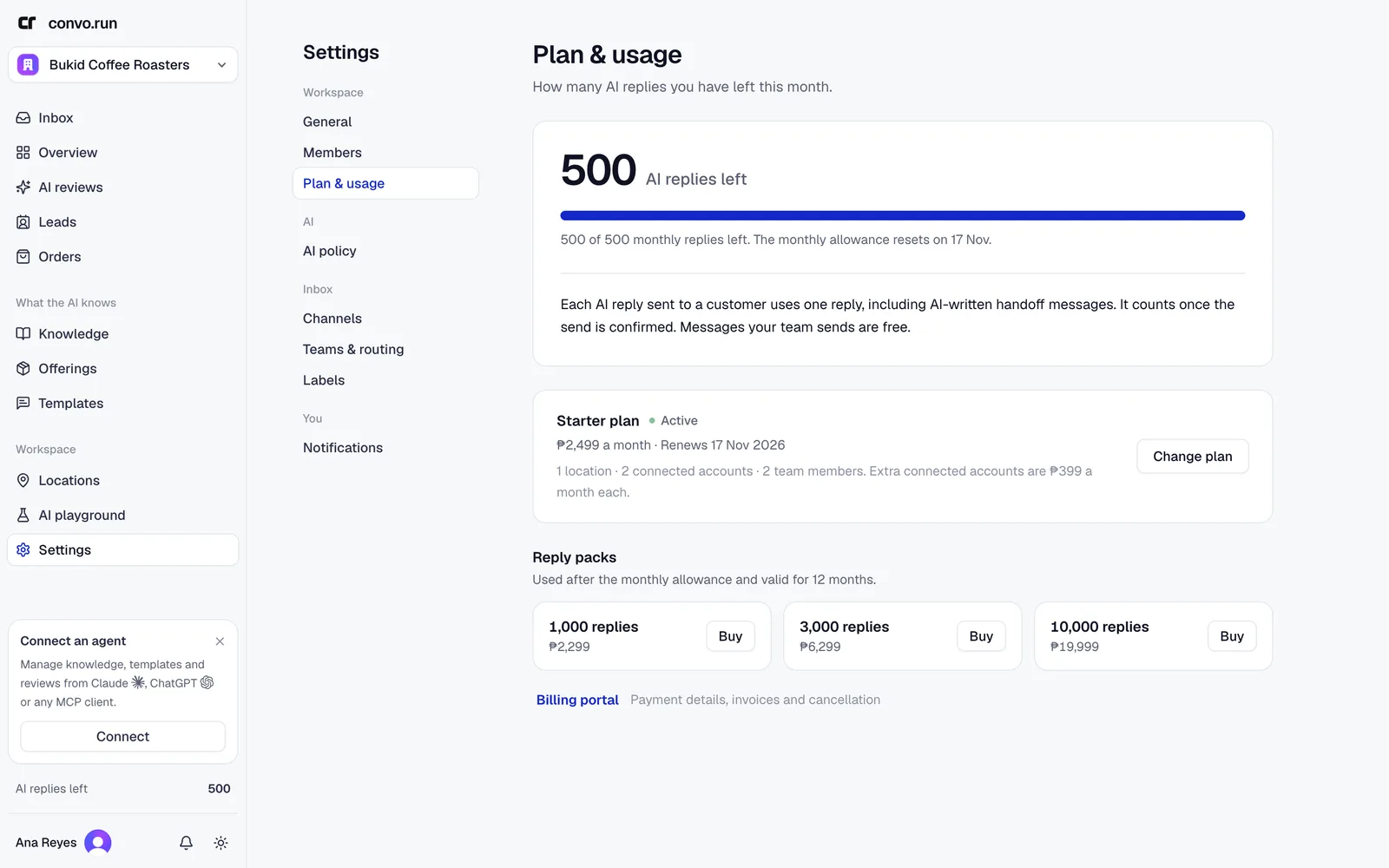
Plans
| Plan | Active locations | Connected accounts | Members |
|---|---|---|---|
| Starter | 1 | 2 | 2 |
| Growth | 4 | 6 | 5 |
| Business | 10 | 12 | 20 |
See convo.run/pricing or the plan page for prices in your currency. Annual plans are billed once a year.
The limits are enforced. Activating another location, connecting another social account, or inviting another member beyond the plan is refused until you free one up or upgrade. Pending invitations count as members. Reconnecting an account you already have doesn't need a free slot. Need more connected accounts without upgrading? Extra accounts are available monthly. Email [email protected].
Website chat is free on every plan and isn't a connected account. Messenger, Instagram, WhatsApp, TikTok and email need an active plan. Each mailbox is one connected account.
AI replies
Each plan includes a monthly number of AI replies, shared by all locations:
| Plan | Philippines | Other countries |
|---|---|---|
| Starter | 500 | 1,000 |
| Growth | 1,500 | 2,500 |
| Business | 3,000 | 5,000 |
A reply counts when the AI sends it on its own, including a handoff message the AI writes. Replies your team sends, approves or edits are free, and so are fixed system messages. The count resets each month on your billing date, also on annual plans. Unused replies don't carry over.
The sidebar shows AI replies left. Owners and admins get an email when 20% are left (unless auto top-up is on) and again when none are left. With no replies left, the AI stops sending automatically: conversations at locations with automatic replies go to your team with a fixed handoff message. At locations in AI drafts for the team mode, the AI still writes drafts for approval, because approved replies are free.
Reply packs
Buy a pack on Plan & usage when you need more than the monthly allowance: 1,000, 3,000 or 10,000 replies. Pack replies are used after the monthly allowance, the pack that expires first is used first, and stay valid for 12 months.
Auto top-up
Owners and admins can turn on auto top-up under Plan & usage. When fewer replies are left than the amount you choose, Convo.run buys the reply pack you picked and charges the card on file, the same card the subscription uses. Each purchase gets its own invoice in the billing portal. You also set how many top-ups may happen per monthly allowance, which caps what auto top-up can spend.
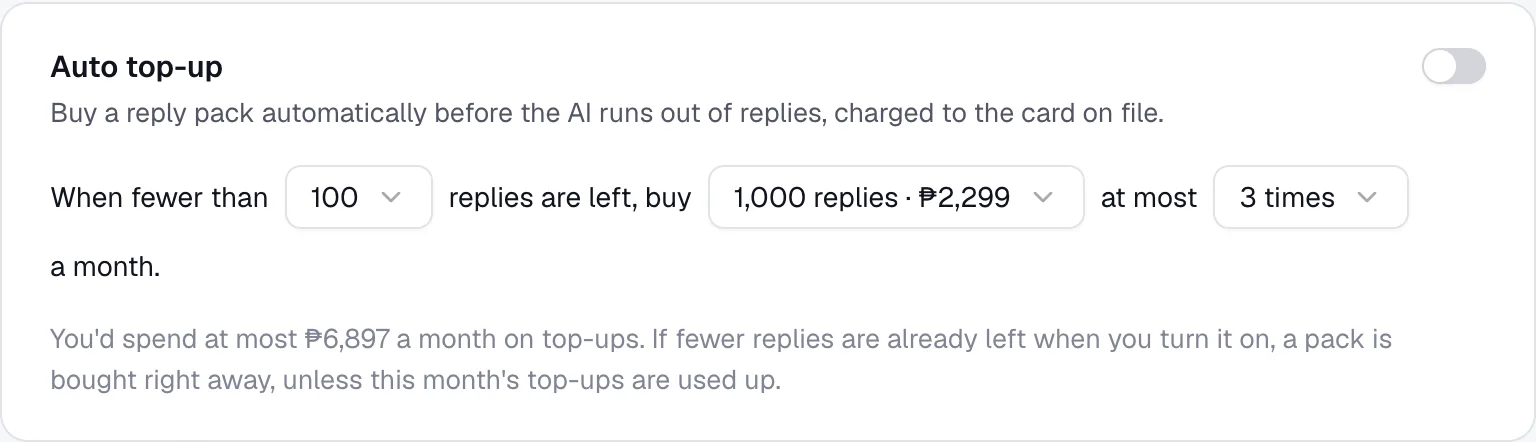
Purchases run one at a time. If fewer replies are already left when you turn it on, a pack is bought right away, unless the month's top-ups are already used up. If the card is declined, or the bank asks to confirm the payment, auto top-up turns itself off and owners and admins get an email. Plan & usage shows the reason. Update the payment method in the billing portal, or check with your bank, then turn auto top-up back on.
Change or cancel
Choose Change plan to switch plans or billing period. Billing portal manages payment details, invoices and cancellation.
Before downgrading, compare what you use with the smaller plan's limits and deactivate locations, disconnect accounts or remove members first. Deactivating a location keeps its history but turns off its AI.
The plan page shows whether cancellation is scheduled and when access ends.